Purpose
This guide explains how a Delivery Service Partner (DSP) processes the Amazon-funded, non-discretionary bonuses in UZIO Payroll for delivery associates (DAs). Amazon funds two bonus categories for the DSP incentive program, and this article covers only these two:
- Realtime — earned and paid in the same pay period (for example, the 5th/6th Day bonus).
- Lookback — earned in one or more prior pay periods (for example, a thank-you bonus).
Both are non-discretionary under the FLSA. That means:
- Each is included in the regular rate of pay.
- Each can trigger an overtime (OT) recalculation.
- UZIO performs that calculation automatically through pre-linked earning codes (see Section 1).
If you have other bonus programs outside the Amazon incentive program, those are not covered here — see Non-Discretionary Bonuses and Overtime Calculation. For the Amazon-funded discretionary "Together We Appreciate" bonus, see Processing Discretionary Bonuses (Amazon-Funded).
Who can do this: Employer Administrators / payroll users on a DSP account.
1. Pre-seeded earning codes
Three earning codes are automatically created and pre-linked on your UZIO account — you don't add or configure them. They're visible under Employer Portal → Payroll → Payroll Setup → Company Earnings.
Code | Earning name (default) | Purpose |
|---|---|---|
NA2 | Realtime Bonus (Bonus — non-discretionary) | Bonus earned and paid in the same pay period. UZIO automatically increases OT / DOT rates within the same payroll. |
LK2 | Lookback Bonus (Bonus — non-discretionary) | Bonus earned in one or more past pay periods. Pre-linked to OTADJ so the retro overtime is calculated and posted automatically. |
OTADJ | OT Adjustment (OT Adjustment) | System-calculated retro overtime amount, posted automatically whenever a Lookback Bonus (LK2) is paid. No manual entry needed. |
Note: The OTADJ earning is system-managed and linked to Lookback Bonus — that linkage is what enables automatic retro-OT. Leave it unchanged.
2. Entering the bonus amounts
When you receive the bonus information from Amazon, enter it into a payroll using bulk upload (recommended) or manual entry on the payroll grid. Both produce the same result on the paycheck.
2.1 Bulk upload (recommended)
Amazon provides two templates per pay run — one for Realtime and one for Lookback. Upload them one at a time into the active payroll; no per-employee data entry is required.
When to upload:
- Realtime — tied to a specific pay period. Upload the Realtime template into the regular payroll covering the pay period shown in the template. Example: a 5th/6th Day bonus earned for the period ending April 16, 2026 goes into the payroll for that same period.
- Lookback — not period-bound. Include it in that payroll or any later run. Example: a Lookback bonus covering March 16–31 can be paid in the April 16 run (or later); UZIO still calculates the retro overtime against the March hours.
Steps:
- Start regular payroll — Payroll → Payroll Dashboard → Start Regular Payroll for the current period. Open Regular Pay Details and confirm the pay-period header matches the period the incentives will be paid in.
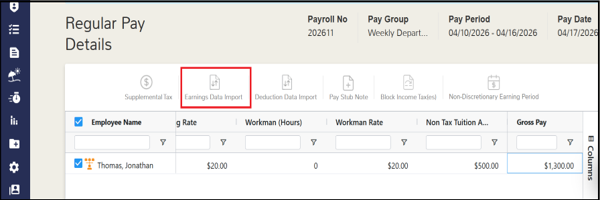
- Open Earnings Data Import — at the top of the Regular Pay Details grid, click Earnings Data Import.
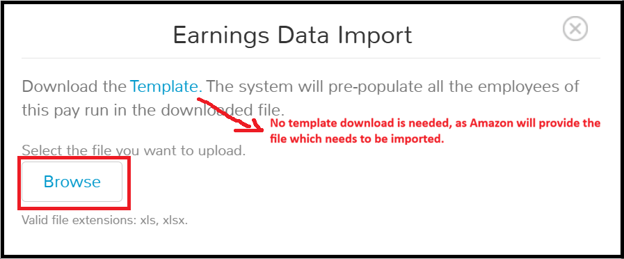
- Upload the Realtime template. Click Browse, select the file, and click Upload.
- The template has one row per eligible employee and one amount column for NA2 Realtime Bonus.
- UZIO validates the file, applies the Realtime Bonus, and recalculates each employee's OT / DOT within the same payroll.
- Upload the Lookback template. Click Browse, select the file, and click Upload.
- The template has one row per employee, an amount column for LK2 Lookback Bonus, and a period column for the historical pay period(s).
- UZIO retrieves each employee's actual worked hours from UZIO Time Tracking for that historical range.
- It recalculates the FLSA regular rate for that period and posts the retro overtime to OTADJ.
- Continue payroll as usual — the Realtime Bonus, Lookback Bonus, and OT Adjustment lines appear on the applicable paychecks; proceed to the Review Payroll Summary.

Upload notes:
- Order is flexible — upload only Realtime if that's all you have; if both, Realtime then Lookback is typical but the order doesn't affect the result.
- Re-upload is supported — UZIO refreshes the amounts for the employees in the new file; you don't need to clear the previous upload.
- On failure, the dialog shows "File upload failed due to data errors. Click here to download the error log."
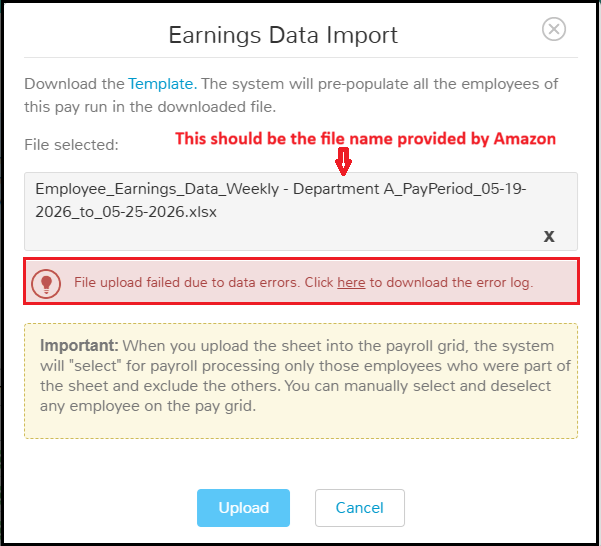
- Click the here link to download the error log. The log shows an upload status and an Error List identifying each failing row by row number and reason — for example: "Row Number 5: Lookback Bonus End Date cannot be before the Start Date."

- To resolve: open the template, correct the flagged row(s) using the guidance below, save, and re-upload the corrected file. Re-uploading is fully supported — UZIO refreshes the amounts for the employees in the file; you do not need to clear the previous upload.
Error | Cause and resolution |
|---|---|
End Date cannot be before the Start Date | A Lookback period's End Date is earlier than its Start Date — correct so End ≥ Start. |
Invalid date format | A date isn't in the template's expected format — re-enter it; don't change the column formatting. |
Employee not part of this pay run | The employee isn't in the current payroll (terminated, inactive for the period, or a different pay group). Remove that row and re-upload; process the removed DA via a Special (off-cycle) Payroll for the period they were active (or manually, Section 2.2). |
After both templates are uploaded, the Realtime Bonus, Lookback Bonus, and OT Adjustment lines appear on the applicable employee paychecks. Continue to the Review Payroll Summary page to review the payroll, as it happens normally when you run the payroll.
Note: Any DA not eligible for the bonus and therefore excluded from the template will be automatically de-selected on the payroll grid after the template upload. Therefore, after each upload, you must use ‘Select All’ on the payroll grid as shown below to ensure those DAs are still processed for their regular wages.
2.2 Manual entry (alternative)
Key the amounts directly on the Regular Pay Details grid — useful for small runs, a missed associate, an Amazon-side correction, or a one-off. Two entry points:
Entry point | What it does |
|---|---|
Global icon (top of grid — "Non-Discretionary Earning Period") | Applies the entered amount and period to every non-exempt employee in the run. |
Per-employee icon (Actions column — calendar-with-dollar) | Sets or overrides the value for one employee — a different amount/period, or 0 to skip the bonus. |
How they work together:
- Saving a global value applies it to all non-exempt employees and clears any earlier per-employee overrides.
- After that, you can still open the per-employee icon on a row to override that one employee.
- Exempt employees are excluded from non-discretionary OT, so the per-employee icon doesn't appear on exempt rows.
- Exempt employees can still receive the bonus. It is processed with no OT recalculation.
Entering or overriding an amount:
- Open the global or per-employee icon.

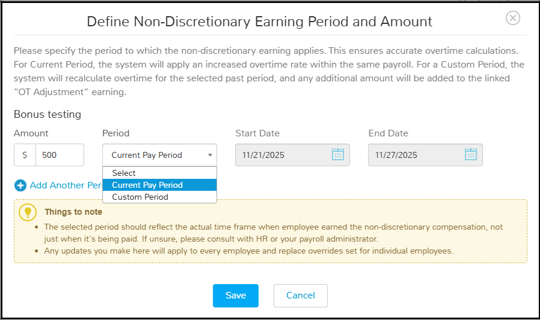
- In the popup, find NA2 Realtime Bonus or LK2 Lookback Bonus and enter the Amount.
- Choose the Period:
- Current Pay Period for Realtime. The dates fill in automatically and are read-only.
- Custom Period for Lookback. Enter the historical start and end dates. Use Add Another Period for up to four date ranges.
- Click Save. For Lookback, UZIO immediately calculates the OT Adjustment and posts it to OTADJ.
3. Review & reconcile before approving
Validate the amounts on the final review screen before approving:
- Continue to Review & Approve (the last step before approving).
- Click Download Payroll Register (available one-click from that screen). It lists every earning line — Realtime Bonus, Lookback Bonus, OT Adjustment — with the underlying hours and rates.
- Reconcile against Amazon's supplementary report: NA2 amounts match the Realtime template; LK2 amounts match the Lookback template.
- If a discrepancy appears, click Back, correct the employee via the per-employee icon (Section 2.2), move forward, and re-download the register to confirm.
- When the register matches Amazon's report, approve the payroll.
Important: Once the run is approved, additional non-discretionary entries cannot be added to the same payroll. Contact UZIO Support at support@uzio.com if you need a change after approval.
4. Overtime (regular-rate) basis
Because both bonuses are non-discretionary:
- Each is included in the regular rate of pay for the period earned, and OT and double-OT (DOT) premiums are trued up.
- You don't calculate this yourself. UZIO posts it automatically: within the run for Realtime, and to OTADJ for Lookback.
- The basis differs for California vs other states, in both the divisor and the multipliers. It is documented below for transparency and audit.
Component | Other states | California |
|---|---|---|
Bonus Rate | Bonus ÷ hours worked = regular + overtime + double-overtime + holiday-premium hours | Bonus ÷ regular (non-overtime) hours |
Bonus OT | Bonus Rate × 0.5 × OT hours | Bonus Rate × 1.5 × OT hours |
Bonus DOT | Bonus Rate × 1 × DOT hours | Bonus Rate × 2 × DOT hours |
The bonus OT and DOT are added to the regular OT and DOT pay. For a Lookback bonus, the same calculation runs against the prior period's worked hours and the total posts to OTADJ.
What counts in the divisor:
- Included: only hours worked, meaning regular, overtime, double-overtime and holiday-premium hours.
- Excluded: paid time off, paid leave and plain holiday pay hours, so they never dilute the bonus rate.
- Lookback bonus: only approved periods are included.
- Exempt employees: excluded from the OT recalculation altogether.
Worked example — hourly rate $15; 50 hours worked (40 regular, 8 OT, 2 DOT); non-discretionary bonus $100, paid for the current period:
Other states | California | |
|---|---|---|
Bonus Rate | $100 ÷ 50 hours worked = $2.00 | $100 ÷ 40 regular = $2.50 |
Bonus OT | $2.00 × 0.5 × 8 = $8.00 | $2.50 × 1.5 × 8 = $30.00 |
Bonus DOT | $2.00 × 1 × 2 = $4.00 | $2.50 × 2 × 2 = $10.00 |
Rounding: the bonus rate is carried to the cent. A real-world rate that isn't a round number (e.g., $2.6190) may make the OT/DOT amounts differ by a cent from a hand calculation. Reconcile to UZIO's Payroll Register, which uses the precise rate.
Compliance
- The employer is responsible for its payroll submission and for compliance with all federal, state, and local laws.
- UZIO provides the calculation engine and audit trail.
- The employer is responsible for the underlying determination of bonus amounts, eligibility, and program design.
Need help?
- Contact your UZIO Customer Success Manager.
- Contact UZIO Support at support@uzio.com or +1-571-601-1752.
- Use the Help menu in the top-right of the Employer Portal.
Related articles
- Non-Discretionary Bonuses and Overtime Calculation — non-Amazon bonus programs
Was this article helpful?
That’s Great!
Thank you for your feedback
Sorry! We couldn't be helpful
Thank you for your feedback
Feedback sent
We appreciate your effort and will try to fix the article
